Auth0 React Starter

React application that implements user login, logout and sign-up features using Auth0.
boilerplate.detail.metadata.lastUpdated
il y a 2 mois
boilerplate.detail.metadata.author
Renaudboilerplate.detail.metadata.price
boilerplate.detail.metadata.free
npx boilerapp auth0-react文档
React Authentication on Vercel
This JavaScript template demonstrates how to implement user authentication in React applications using Auth0. This template uses the React Router 6 library.
This template is based on a code sample is part of the "Auth0 Developer Center", a place where you can explore the authentication and authorization features of the Auth0 Identity Platform.
Quick Auth0 Set Up
First and foremost, if you haven't already, sign up for an Auth0 account to connect your application with the Auth0 Identity Platform.
Next, you'll connect your Single-Page Application (SPA) with Auth0. You'll need to create an application registration in the Auth0 Dashboard and get two configuration values: the Auth0 Domain and the Auth0 Client ID.
Get the Auth0 domain and client ID
-
Open the Applications section of the Auth0 Dashboard.
-
Click on the Create Application button and fill out the form with the following values:
- Name:
React Authentication on Vercel - Application Type:
Single Page Web Applications
- Name:
-
Click on the Create button.
Visit the "Register Applications" document for more details.
An Auth0 Application page loads up.
As such, click on the "Settings" tab of your Auth0 Application page, locate the "Application URIs" section, and fill in the following values:
- Allowed Callback URLs:
https://*.vercel.app/callback - Allowed Logout URLs:
https://*.vercel.app - Allowed Web Origins:
https://*.vercel.app
🚨🚨🚨 WARNING: Once you have deployed this template, please replace https://*.vercel.app with your Vercel deploy URL for better security. 🚨🚨🚨
Scroll down and click the "Save Changes" button.
Next, locate the "Basic Information" section. You will need the "Domain" and "Client ID" values to deploy this template correctly.
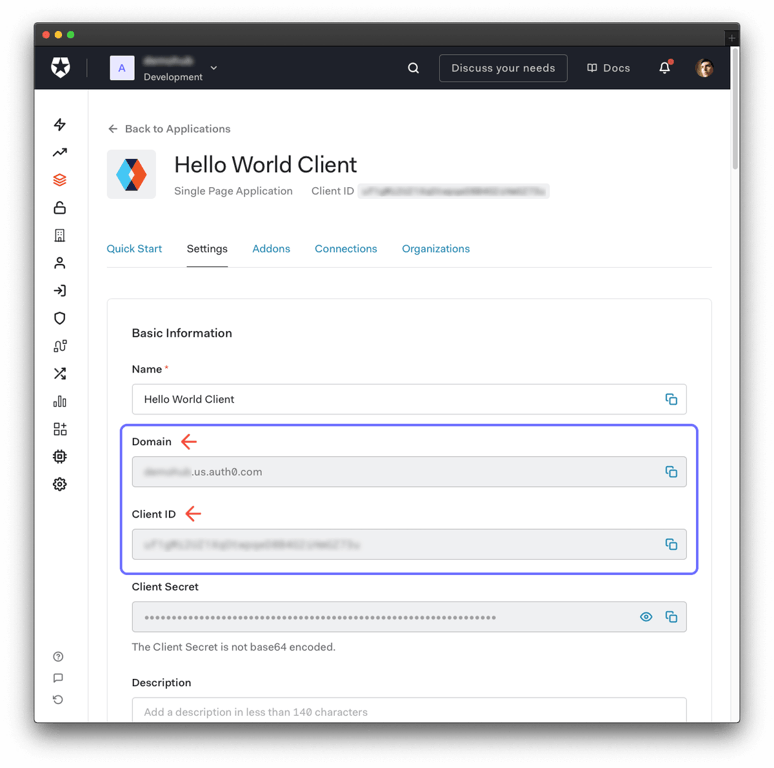
Once you click the "Deploy" button, the Vercel deploy workflow will show up. On the "Configure Project" section, ensure that you use the following values for the "Required Environment Variables":
REACT_APP_AUTH0_DOMAINis the value of the "Domain" field from the Auth0 settings.REACT_APP_AUTH0_CLIENT_IDis the value of the "Client ID" field from the Auth0 settings.
After Deploy
Remember to replace https://*.vercel.app with your Vercel deploy URL in the Auth0 application settings.
Use the React Sample Application
Your Vercel deploy URL gives you access to the application.
If you want to learn how to implement user authentication in React step by step, check out the "React Authentication By Example" developer guide.
When you click on the "Log In" button, React takes you to the Auth0 Universal Login page. Your users can log in to your application through a page hosted by Auth0, which provides them with a secure, standards-based login experience that you can customize with your own branding and various authentication methods, such as logging in with a username and password or with a social provider like Facebook or Google.
Once you log in, visit the protected "Profile" page to see all the user profile information that Auth0 securely shares with your application using ID tokens.
Click on the "Log Out" button and try to access the Profile page.
If everything is working as expected, React redirects you to log in with Auth0.
Why Use Auth0?
Auth0 is a flexible drop-in solution to add authentication and authorization services to your applications. Your team and organization can avoid the cost, time, and risk that come with building your own solution to authenticate and authorize users. We offer tons of guidance and SDKs for you to get started and integrate Auth0 into your stack easily.